Dashboard
·supabase/phase1_schema.sql then supabase/phase1_seed.sql
in the Supabase SQL editor, then reload this page.
Manage your business's AI use
For every business that uses AI — whether or not the EU AI Act reaches it.
EU AI Act workflow — for businesses the Act reaches
Four steps towards EU AI Act readiness, if the Act applies to your business.
- 1 Record every software tool in use across the business. Already have a list? Use Paste a list.
- 2 Catalogued software arrives with its AI features documented.
- 3 Can't find your software in the catalogue? Type the name in to add it to your library, then name the AI features it contains.
- 4 Once every tool is listed, start a Risk Assessment — that is where you record which AI features are switched on and what you use them for.
Not here? Type its name in the box above — software outside the catalogue is still assessed, from your answers.
Paste the names of your software, one per line or separated by commas. A column copied from a spreadsheet works too. Up to 200 names at a time. Nothing is added until you confirm.
Your library is empty. Add your first software tool above.
Your software
- 1 Create a risk assessment. It takes your software library exactly as it stands today.
- 2 Work through Steps 1, 2 and 3.
- 3 Confirm the Article 25 statement — that you are only a deployer, not a provider.
- 4 Lock it. A locked assessment is ready for the Actions Tracker. Create a new one whenever your software or its risk changes.
No risk assessments yet. Create one to assess your software library.
1 Step 1 — AI features switched on/off status
Record each AI feature as on, off, or not sure. Do not assume a feature you never use is switched off — one running quietly in the background can still be doing something you would have to declare.
2 Step 2 — what you use AI fori
What does your business use AI for? Answer once for the whole business, then tick which of your tools you use for it.
3 Step 3 — the full picture
A summary of every AI feature you listed, and what you said about each one.
Deployer status — Article 25
This assessment covers your obligations as a deployer. Under Article 25 you are treated as a provider, and carry the provider's obligations, if you:
- put your name or trademark on a high-risk AI tool supplied by another;
- substantially modify a high-risk AI tool; or
- repurpose an AI tool so that it becomes high-risk — for example, using a general-purpose tool to make hiring decisions.
You may lock this assessment without confirming, but the Actions Tracker covers deployer obligations only and cannot be built from it. Seek advice if any of the above applies.
- 1 Create a tracker from a locked risk assessment — one that has confirmed the Article 25 statement.
- 2 Record what your business actually does against each obligation, and mark your progress. Use notes for evidence.
- 3 Action tracker does not have to be finished before you move on — a report can be produced at any point, and it states how far you had got.
No actions records yet. Create one from a locked risk assessment.
- 1 A report is the last step. It is created from an Actions Tracker record, in whatever state that record has reached.
- 2 It brings together your software library, your risk assessment and your progress on the actions.
- 3 Download or print it. A report is frozen as it stood on the day it was created.
No reports yet. Create one from an Actions Tracker record.
AI literacy learning modules
- 1 Open a learning module and share its video and knowledge check links with your team, by email or your preferred method.
- 2 The knowledge check tests your team with short questions based on its training video.
- 3 The knowledge check link works only while your pass runs — ask your team to complete it before the pass ends, or extend the pass if needed.
- 4 Follow your team’s answers in the module’s Results section.
- 5 When your pass ends, your results stay here to view; the knowledge check link closes until you buy another pass.
Frequently asked questions
What the pass covers, how the categories are decided, and what happens to your work afterwards. How it works has the detail behind every answer.
Before you buy
Can I see what I get before I pay?
Yes. A complete worked example sits on your account from the moment you sign up — a demo company with a finished risk assessment, a filled-in actions tracker and a dated report you can open and read end to end — and a finished set of AI Use Rules. The AI-literacy training videos are free to watch too. It is not a screenshot; it is the real thing, built by the same screens you would use. It stays free, pass or no pass.
What does the £99 pass unlock?
Making your own records. With a live pass you can create and change risk assessments, work through the obligations that fall on your business in the actions tracker, and produce a dated report as many times as you like for 60 days. In My Place you can also write and release your own AI Use Rules, and share the AI-literacy learning modules with your team and collect their knowledge check results.
What is free without a pass?
Creating an account, browsing the software catalogue, building your software library, the worked examples, the AI-literacy training videos, How it works and this FAQ — and everything you have already made. Records you created stay open to read and your reports stay there to download, whether or not a pass is running.
Is it a subscription?
No. One payment, 60 days. Nothing renews, no card is kept on file, and there is nothing to cancel.
Why is a pass not refundable?
Because the whole product can be seen before any money changes hands. The worked examples are a complete assessment, tracker, report and set of AI Use Rules, and How it works explains every step — nothing is hidden behind the payment except your own results, and those are released the moment a pass starts.
If something has gone wrong, say so and it will be dealt with fairly; nothing in the terms affects your rights under consumer law. Questions before buying are welcome at aicompliancy@outlook.com.
Is this legal advice?
No. It is a structured way to work out how the EU AI Act applies to the software your business uses, quoting the Act's own words, so you can show what you checked and when. It does not replace a lawyer where you need one. The AI Use Rules you write and the AI-literacy learning modules are guidance and training for your business, not legal advice either.
How the pass works
When do the 60 days start?
The moment the payment goes through. The exact end date is on the pass card on your dashboard and in My Account, with the days remaining beside it.
What happens when the pass ends?
Nothing is taken away. Every assessment, tracker and report stays yours to open, read and download, and your software library keeps working. What stops is making changes and producing a new dated report: draft AI Use Rules become read-only (released versions stay open to read and print), and your knowledge check links close — the results already received stay in My Place.
Can I buy another pass later?
Yes, whenever you need one — a yearly review, a new tool, a customer asking questions. Your data is still exactly as you left it.
What if I buy again before my pass runs out?
The 60 days are added to the end of the pass you already have, not to today. No days are lost.
Using it
Do I have to list every piece of software?
List what your business actually uses. Anything in the catalogue arrives already assessed, feature by feature; anything else you can add yourself and answer one short question about whether it uses AI.
What if a tool I use is not in the catalogue?
Add it. You will be asked whether it uses AI, and it is carried through the assessment with everything else — flagged as a risk not established, so it shows up as something to go and check rather than being quietly ignored.
How do I know the categories are right?
A category comes from the questions in Step 2, and those questions are the Act’s own — each one quotes the provision it rests on word for word, with a link to the official text, checked against the Act, the Omnibus amendments and the official guidelines. Catalogue entries do not assign a category: each records what the vendor says its AI does, with the page it came from and the date somebody read it.
The catalogue, the risk questions and the obligations are reviewed regularly against the rules as they stand, and every entry is read by a person before it goes live — the aim is accurate, current detail, not a guess from an automated system. It cannot be guaranteed error-free. If something looks wrong for your business, say so and it gets checked: aicompliancy@outlook.com.
How do I stay up to date?
The catalogue grows and is revised as new software and new AI features appear — including tools customers have added themselves, which get catalogued properly rather than left as an unknown. When the rules move, the risk questions and the obligations move with them, along with the dates each duty starts to apply.
An assessment you have locked stays exactly as it was, on purpose — a dated report has to say what was true on its date. Changes since then are recorded and carried into your next assessment and your next report, so you can see what moved and when.
When do I need to come back to this?
Whenever something changes. A new tool, a new way your business uses AI, a feature switched on or off, a new rule, or an obligation whose start date has arrived — each one is a reason to update your assessment and produce a fresh dated report.
If something changes here that could affect your report — a tool in your library, one of the risk questions, or one of the obligations in your tracker — you are emailed about it. That is part of the service, so it reaches every account, with or without a pass.
What is the report for?
Handing to a customer, an insurer, an auditor or your own board. It is dated, it names every tool and its AI features, every question the Act asks with the answer you gave, the category each declared use falls into, and what you have done about the duties that follow — evidence that you looked, what you found, and what you are doing about it.
Account and data
Who can see my data?
Your login is the only way into your account, and one business's records are never visible to another. The person who runs AI Compliancy can see your library and your answers, to support the service and keep it working — but not the notes you write against a tool or one of its features. Data is held with the providers listed in the privacy policy, is not sold, and is not shared with anyone for their own marketing.
Can I delete my account?
Yes, from My Account. It permanently removes your software library and every risk assessment, actions tracker and report you have made, and it cannot be undone. Any time left on a pass is lost and is not refunded — download anything you want to keep first.
What if I am stuck, or something looks wrong?
Write to aicompliancy@outlook.com — a real reply, not a bot. Questions about the Act itself are as welcome as questions about the app.
Still not answered? How it works goes through the same ground step by step, and aicompliancy@outlook.com is always open.
How it works
A short guide through the four stages, and the report they produce.
Last checked 8 September 2026
The four steps
- 1 Build your software library
- 2 Risk assess your AI tools
- 3 Take corrective action
- 4 Generate your report
Four stages, in order. Each produces the record the next is built from, so nothing is entered twice.
1 Software library
The library lists the software a business runs and the AI features inside each one — including features that may be switched on without anyone having noticed. Every feature carries a short description of what it does, in the vendor’s own account, with a link to the page that says so and the date somebody last read it. Software the catalogue has not reached yet, and features a vendor has only just shipped, can be added by hand and count exactly the same.
See SW in Library for what a card holds.
2 AI tools risk assessment
An assessment is a dated record of what was true on one day, and is locked once it is finished. It asks three things:
- Step 1 records the state of every AI feature — on, off, or not sure. It captures what was found on the day somebody looked, rather than a standing fact about the software.
- Step 2 asks what the business uses AI for, in the Act’s own questions, once for the business rather than tool by tool, with the tools tagged against each answer. This is the step that decides everything else: a level belongs to a use, so the obligations come from here and nowhere else.
- Step 3 sets the two against each other and accounts for every feature under Status of AI features, in the same five groups the report prints — inconsistent answers, in use for a declared purpose, switched ON but not used for any declared purpose, switched off, and not confirmed. Inconsistent answers come first.
With all three answered the assessment can be locked. That is what makes it a record: it stops changing, and the Actions Tracker is built from it.
A lock is held open by anything left blank and by anything that cannot be true.
Blank
- A Step 2 question unanswered
- A Yes with no tool named against it
- An AI feature with no on/off/not-sure recorded
- A feature running that no declared use accounts for, and that has not been confirmed as serving none of them
Contradictory
- A feature recorded as off that Step 2 names as the thing doing the job
- A tool whose library card says it has no AI while Step 2 names it
“Not sure” is an answer and never blocks a lock — it makes the assessment provisional and says so.
A locked assessment also carries an Article 25 statement — that the business is a deployer of AI built by others and has not become a provider of it. That statement does not hold the lock open, but the Actions Tracker cannot be built without it, since it holds deployer obligations only.
3 Actions Tracker
The tracker turns a locked assessment into the work it implies: one card per AI feature that carries obligations, and on each card the duties that follow from the use it serves, with the date each starts to bind, where it stands today, and a note recording what was done about it. Prohibited practices get a single card each, because there the duty is the same one however many tools carried it out.
Work on it runs as long as it needs to. A tracker does not have to be finished before a report is made from it — a report can be taken at any point, and states the progress as it stood.
Nothing new is decided at this stage. The Act’s own wording sits behind the ⓘ on every duty; the notes beside them are the business’s own. See Your obligations for the duties and their dates.
4 Report
The report gathers the whole record into one document: the software and its AI features, every question the Act asks with the answer given, what was switched on and what was not, the Article 25 statement, and the progress on each duty — with every provision it relies on quoted word for word at the back.
A report can be made whenever anything earlier changes — software added, a switch answered differently, a duty completed. Each one is a fresh document rather than an edit to the last, so the older ones stay as they were and the set of them is the history.
A report is frozen as it stood on the day it was made, which is what makes it evidence — it cannot be quietly improved later. Producing one is not itself an obligation under the Act; it is the dated proof that the work was done, and of what was known at the time.
Software in your library
The library is the list of software a business runs, and what AI sits inside each one. Every tool carries one of two tags, and the tag decides what its card holds: In catalogue, where the AI features have already been researched and written up, or Manual assessment, where the catalogue has not reached that software yet — anything already in use can be named on the card, and is welcome there.
Either way a card describes the software and stops there: what AI is in it, what each feature does, and where that description came from. See The four steps for where the library sits in the order.
A catalogued feature
doc.workday.comthe vendor page the description was read from, so a reader can go and check itThree fields, and that is the whole card. The date the tool was added sits in its heading, beside the In catalogue tag.
And one field that is yours, on every card. A Notes box sits under the features of any tool, catalogued or not — who may use it, what was decided, when it is reviewed. It is optional, and whatever is in it appears in the report beside that tool.
Software outside the catalogue (Manual assessment)
Software the catalogue has not reached yet carries the Manual assessment tag, and its card is filled in by hand. Each one opens with the question only the business can answer — does this tool have AI features? — and the answer decides what the card becomes.
The tool has no AI in it. This is the only answer that puts a tool outside the Act entirely, and the only one that closes the card, since there is nothing left to name.
The AI is there but switched off or unused — which is not the same as having none. The card still asks for each feature by name, so the library holds AI that exists and is sitting idle.
The features are named by the business, in its own words. One named this way counts exactly as a catalogued one does — same weight, everywhere it is read.
A feature named by the business
The same kind of AI as the catalogued feature above, under the name a business might use for it — the two names need not match.
Business use categories
The Act sorts every AI use into one of four categories. A category belongs to the use, not to a tool or a feature — the same software can sit in two different categories in two different businesses.
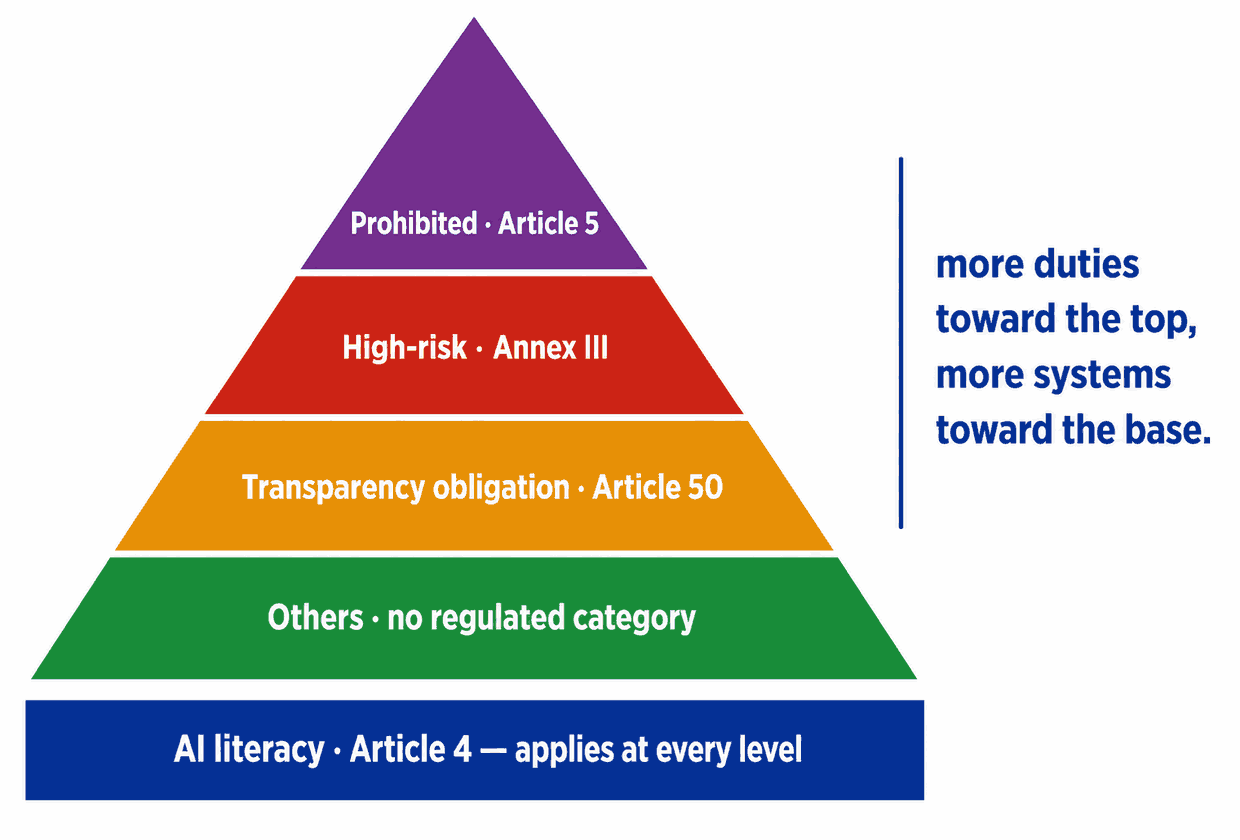
Banned outright. A short list of uses no one may deploy.
Allowed, but the most obligations. AI used in sensitive areas like hiring or credit.
Allowed, with a duty to disclose. Uses where the Act requires people to be told AI is involved — chatbots, deep fakes, emotion recognition, biometric categorisation.
Most everyday tools. What is left once the three above are each ruled out, so none of their obligations follow — but AI literacy (Article 4) still applies, as it does in every category. Voluntary codes if you want them.
The category and the date are separate questions. A use is High-risk from the day it starts, but the deployer duties that come with it do not bite until 2 December 2027. Article 50 transparency starts 2 August 2026, and the Article 5 bans have applied since 2 February 2025. See Your obligations for the date against each duty.
How an AI use is classified
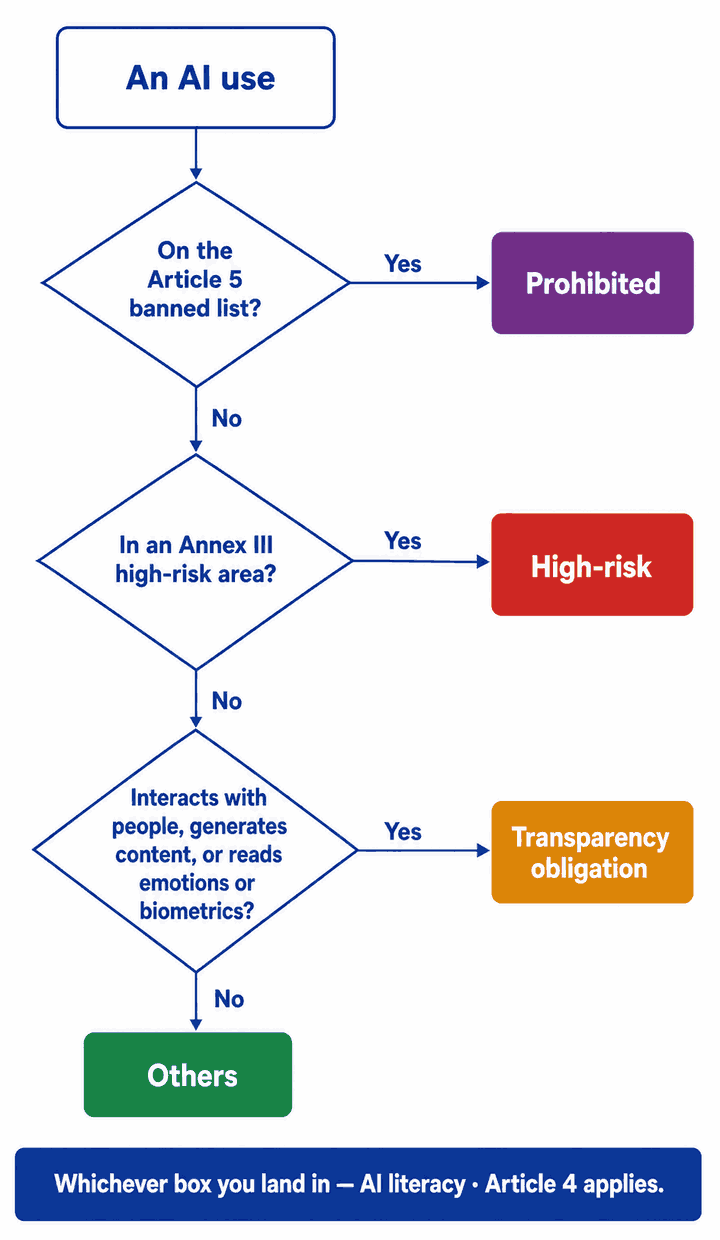
The 8 high-risk areas (Annex III)
Annex III is a closed list of eight areas. A use has to sit inside one of them to be high-risk by this route — and only the Commission can add to the list.
Areas 2, 6, 7 and 8 belong to utilities, police, government and the courts. What an ordinary business meets is 4, wherever AI touches hiring or managing people, 5 in finance and insurance, 3 if it teaches or trains, and 1 wherever a tool identifies people, sorts them by what their biometrics suggest, or reads emotions.
Area 1 does not cover verification. A face or fingerprint check whose only job is to confirm you are who you say you are — door entry, clock-in, unlocking a laptop — is written out of the high-risk list by the Act itself, and your assessment carves it out the same way. What area 1 catches is identifying someone out of a crowd, or sorting people by what their biometrics suggest about them.
Area 5 also covers emergency calls. Evaluating or classifying them, dispatching first responders or setting the order they are sent in, and patient triage, all sit in point 5(d) alongside credit scoring and life and health insurance pricing.
Being in an area is not always the whole answer. Article 6(3) can let a system out of the high-risk list, but only where both halves hold: it poses no significant risk of harm to health, safety or fundamental rights — including by not materially influencing the outcome of a decision — and it does no more than one of four things: a narrow procedural task, improving work a person has already done, flagging patterns without replacing human judgement, or preparing an assessment somebody else makes. Never where it profiles people. That call belongs to the provider, who has to document it before the system is sold, so it is something to ask a vendor for rather than something to decide for yourself.
Landing in one of these areas is what makes a use high-risk; it does not say when the duties start. See Your obligations for those, and their dates.
Banned outright (Article 5)
Article 5 prohibits practices, not products, and it reaches every business whatever category the rest of its AI use falls into. What it bans for a business is the use — the same Article also bans putting such a system on the market, which is the provider’s side of it.
- Subliminal, manipulative or deceptive techniques that materially distort behaviour, in a way that causes or is likely to cause significant harm — 5(1)(a)
- Exploiting vulnerabilities of age, disability or a specific social or economic situation to distort behaviour, again where significant harm is caused or likely — 5(1)(b)
- Social scoring: rating people over time on their social behaviour or personal characteristics, where the score then counts against them in an unrelated context or out of all proportion — 5(1)(c)
- Predicting who will commit a crime purely from profiling or personality traits — supporting a human assessment already grounded in objective facts is not caught — 5(1)(d)
- Building or expanding facial-recognition databases by untargeted scraping of images from the internet or CCTV — 5(1)(e)
- Inferring people's emotions in the workplace or in education — unless the system is there for medical or safety reasons — 5(1)(f)
- Biometric categorisation to deduce race, political opinions, trade union membership, religious or philosophical beliefs, sex life or sexual orientation — labelling or filtering a biometric dataset you hold lawfully is not caught — 5(1)(g)
- Real-time remote biometric identification in public spaces for law enforcement, outside the narrow cases the Act allows — 5(1)(h)
- Generating or altering realistic sexual images, video or audio of an identifiable person without their freely given, specific, informed and explicit consent — 5(1)(ba)
- Generating or altering material depicting the sexual abuse of children — 5(1)(bb)
For a business deploying AI, these two bite where the system is used to generate that material — Article 5(1a)(b). The conditions about what a system was designed or trained to do fall on whoever puts it on the market. They are already in your assessment, marked as not yet in force.
The exact legal wording of each is shown against the relevant question inside your assessments.
Your obligations — grouped by category
Obligations follow the category. As a deployer (a user of AI built by others), your high-risk obligations come mostly from Article 26.
- Take measures to support the development of AI literacy in your staff, and in anyone else operating or using AI on your behalf — contractors and agency staff included — Article 4(1)
- What is enough is judged against their technical knowledge, experience, education and training, the context the AI is used in, and the people it is used on — Article 4(1)
- No particular level has to be guaranteed in any individual — Article 4(1)
Article 4 was replaced by Regulation (EU) 2026/1744, in force 27 July 2026, and the version above is the current one: the duty is to take measures that support AI literacy, and the sentence ruling out a guaranteed level in any individual is new. The date did not move — it has applied since 2 February 2025 either way. Only what it asks for changed.
- Follow the provider's instructions — 26(1)
- Assign human oversight — 26(2)
- Ensure input-data quality — 26(4)
- Monitor; suspend & report on risk — 26(5)
- Keep logs — for as long as the tool’s purpose warrants, and at least six months — 26(6)
- Inform workers — 26(7)
- Inform affected individuals — 26(11)
- Cooperate with authorities — 26(12)
- Register the system in the EU database — 26(8) — public authorities only; not for critical infrastructure
- Fundamental Rights Impact Assessment — Article 27 — see Business types; not for critical infrastructure
- Use the provider’s information in your DPIA, where one is required — 26(9) — part now, part from 2 Dec 2027
- Explain AI-assisted decisions — Article 86 — from 2 Aug 2026, earlier than the duties above — not for critical-infrastructure systems
- Tell people exposed to emotion recognition or biometric categorisation — Article 50(3)
- Label deep fakes and AI-written public-interest text — Article 50(4)
- Make that disclosure clear and distinguishable, and get it to people no later than their first exposure — Article 50(5)
Article 50(1) and 50(2) are the provider's: telling people they are dealing with an AI system, and marking generated output so a machine can detect it. Those are built into the software and you cannot do either, so such a row arrives in your tracker marked as the provider's — listed so the obligation is accounted for, with no tick box, and left out of your completion figure.
- What is left once Article 5, Annex III and Article 50 have each been ruled out — so none of the duties in this tab follow from it
- AI literacy still applies, as it does to every category
- Voluntary codes if you want them — Article 95
- Discontinue the use immediately — Article 5
- The two prohibitions added by the Digital Omnibus bite from 2 Dec 2026
When these start. The Digital Omnibus — Regulation (EU) 2026/1744 — moved the high-risk deployer duties back from 2 August 2026 to 2 December 2027. Two of them keep dates of their own, shown above: the DPIA duty is part now and part from 2 December 2027, and the right to an explanation starts on 2 August 2026 — earlier than the duties beside it, because the Omnibus postponed Chapter III and the right to an explanation sits in Chapter IX, which it did not touch. Every row in your Actions Tracker states its own.
Critical infrastructure is the exception. AI acting as a safety component in critical digital infrastructure, road traffic, or the supply of water, gas, heating or electricity is high-risk — but the Act leaves it out of three duties by name: the Fundamental Rights Impact Assessment, EU-database registration (those systems are registered nationally instead) and the right to an explanation. Your Actions Tracker applies that for you. AI that only makes such a service run better is not a safety component at all — Article 6(1a), inserted by the Omnibus, puts user assistance, performance optimisation, service efficiency, automation, convenience and quality control outside the term where nothing safety-related turns on them, and the Act’s recital 55 puts anything used solely for cybersecurity outside it too. Traffic-flow analytics and demand forecasting are the usual examples. A tool that sits there is not high-risk on this ground at all, so none of the duties above follow from it — but the exemption falls away the moment failure would endanger health or safety, and Article 6(1b) says so in terms: whatever paragraph 1a puts outside, a system whose failure or malfunctioning would endanger health and safety is a safety component. So the test is what happens when the thing goes wrong, not what the tool is sold as.
Producing the report is not itself an obligation under the Act. It is the evidence that the work above was done, and the dated record of what was known at the time.
Business types — why they matter
Which obligations fall on you also depends on your organisation type (chosen at sign-up, editable in My Account).
The deployer obligations by category. Nothing extra from being a private business — though scoring creditworthiness, or pricing life or health insurance, still brings the Article 27 assessment, whoever you are.
The same — plus a Fundamental Rights Impact Assessment (Article 27) before using a high-risk system, other than one in critical infrastructure.
The same, the Article 27 assessment applies to you too, and one more that falls on nobody else: check the system is registered in the EU's public database of high-risk AI before you use it, and don't use it if it isn't (Article 26(8)) — critical-infrastructure systems are the exception, and are registered nationally.
Not sure which you are? The test is whether you deliver the service to the public, not whether the public sector is your customer. A care provider on a council contract, an academy trust or a housing association is delivering public services; a company selling software or consultancy to councils is not. The full test sits beside the choice in My Account.
Changing your type later affects new Actions Trackers only. Trackers you have already built keep the type they were created with, so the record of what you were told at the time stays intact.
A Fundamental Rights Impact Assessment also applies to any business using AI to evaluate someone's creditworthiness or set their credit score, or to assess risk and set prices for life or health insurance (Annex III 5(b)/(c)). Credit scoring used purely to detect financial fraud is carved out, and other insurance — motor, property, travel — is not in the provision at all.
One exception runs the other way: the Fundamental Rights Impact Assessment is not required for critical-infrastructure systems (Annex III point 2), whoever you are.
Your business
Not sure?
The test is whether you deliver the service to the public, not whether the public sector is your customer.
This usually applies if you are a care provider working under a local-authority contract, an academy trust or free school, a GP practice or private NHS provider, a housing association, or a contracted provider of employment, probation or immigration services.
It usually does not apply if you sell software, recruitment, consultancy or equipment to councils, schools or the NHS. Having public sector clients is not the same as delivering a public service.
This is a judgement call. If you are close to the line, it is worth asking your legal adviser — it changes which obligations appear in your Actions Tracker.
Saves your business name, EU or EEA exposure and organisation type. Reports already made keep the answers they were made with — if you change these, create a new actions tracker and report so they reflect it.
Danger zone
Delete knowledge check results
Permanently deletes every knowledge check result your team has sent — names, work emails and scores — from every learning module. Your share links keep working. This cannot be undone.
Delete account
Permanently deletes your account, your software library, and every risk assessment, actions tracker and report you have created. Any time left on your pass is lost and is not refunded. This cannot be undone.
Your pass
Sign-in
Emails
Messages about your account and your library — a password reset, or a tool of yours being reclassified — are sent either way.